How to Set Up a Smart Home Hub with Google TV Streamer
6 days ago • 6 min read
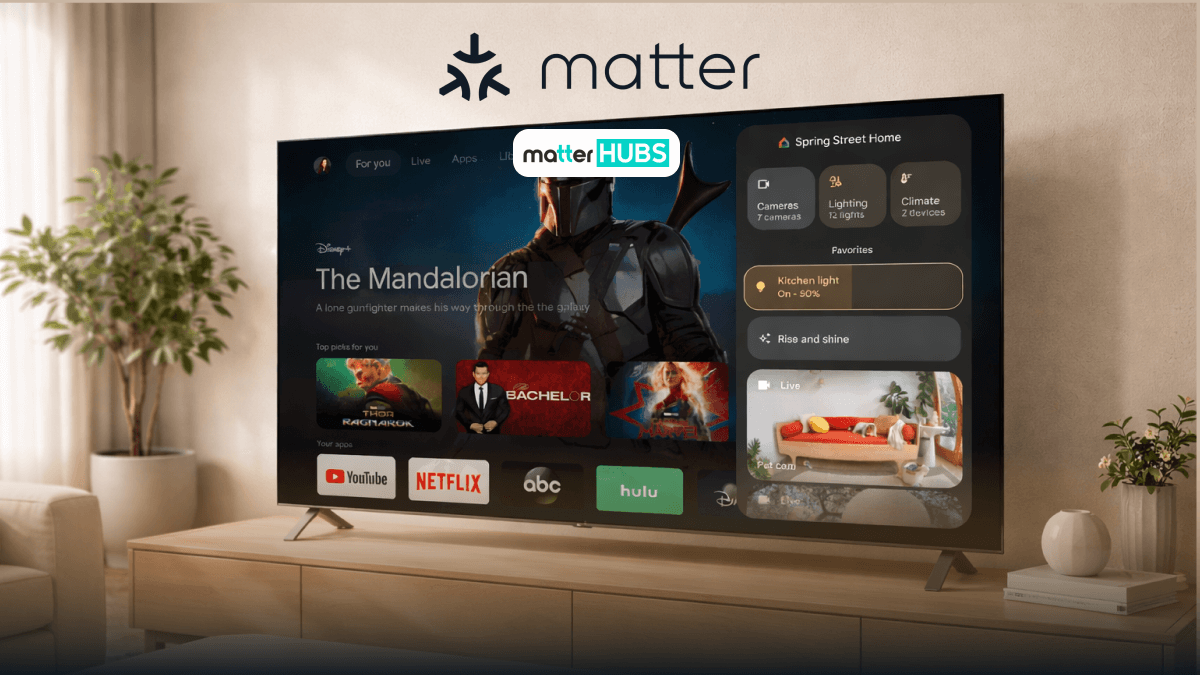
You bought a Google TV Streamer to watch Netflix but what if can also turn off your lights, show your front-door camera, and control your entire smart home. Yes, your Google TV Streamer can function as a smart home hub interface by integrating with Google Home. This means you can manage lights, plugs, cameras, and Matter devices directly from your TV using on-screen controls or Google Assistant voice commands. Let me explain to you how.
What is a Google TV Streamer and How Does it Fit into a Smart Home?
Google TV Streamer is primarily a streaming device. But you can make it much more powerful when paired with Google Home and other Google services. You can sign into the same Google account as your Google home app and experience,
- A visual smart home hub dashboard
- A voice-enabled control point using Google Assistant
- A live camera viewing screen for smart home devices
- A routine trigger surface connected to Google Home
Google TV Streamer doesn't replace the existing smart hub. It unites control in your smart home. This is especially useful in shared spaces were using one app on a phone to control smart home devices isn’t always practical.
What Do you Need Before Setting Up a Smart Home Hub with Google TV Streamer?
Before setting up your Google TV Streamer as part of your smart home, make sure you have the following:
Required
- Google TV Streamer (latest firmware)
- A Google account
- Google Home app (Android or iOS)
- Stable Wi-Fi network
- Compatible smart home devices (lights, plugs, cameras, thermostats)
Optional but Recommended
- Matter devices for future-proof compatibility
- Nest speakers or displays
- A Thread border router for advanced Matter smart home setups
Important: The Google TV Streamer does not replace Zigbee or Z-Wave hubs. It relies on Google Home, supported bridges, and cloud-based Google services.
How Do you Set Up Google TV Streamer for the First Time?
If this is your first time using a Google TV Streamer, start here:
- Connect the Google TV Streamer to your TV via HDMI.
- Power it on and select the correct HDMI input.
- Sign in with your Google account.
- Connect to Wi-Fi.
- Install any pending firmware updates.
Once setup is complete, you’ll land on the Google TV home screen. This is where Google Cards, recommendations, and Google services begin to personalize your experience. Also, where your smart hub integration starts.
How Do you Add Google TV Streamer to Google Home?
In most cases, the Google TV Streamer appears automatically in the Google Home app once you’re signed in.
How to Add Google TV Streamer to Google Home?
- Open the Google Home app.
- Go to Devices.
- Find you Google TV Streamer.
- Assign it to a room (Lving Room is typical).
- Confirm Google Assistant is enabled.
Once assigned, your Google TV Streamer becomes part of your Google Home TV layout, routines, and device control system all managed through one app.
How Do you Use Google YV as a Smart Home Dashboard?
This is where the Google TV Streamer truly shines as a smart hub. Because it will turn your TV into a shared control center for your home. You can get quick access to your smart home devices. All from the comfort of your couch.
What you Can Control from the TV
- Turn lights on and off
- Adjust brightness and colors
- Control smart plugs
- View live camera feeds
- Adjust thermostats
- Trigger Google Home routines
All of these controls are powered by Google Home, visible through the Google TV app interface, and backed by Google’s ecosystem.
For households using multiple smart home devices, this shared screen approach works better than relying on one app on a single phone.
How Does Voice Control Work with Google Assistant on Google TV?
The Google TV Streamer includes a microphone-enabled remote that connects directly to Google Assistant and Google Home.
Supported Commands
- “Turn on the kitchen lights”
- “Set the thermostat to 22 degrees”
- “Show me the backyard camera”
- “Activate Movie Night”
Because the Google TV Streamer is part of your Google Home TV environment, voice commands feel natural, shared, and visual. Especially when controlling cameras and smart home devices.
Can you Use Matter Devices with Google TV Streamer?
Yes. It will be an indirect integration. Matter devices connect through Google Home, and the Google TV Streamer acts as the control interface and display layer for your Matter smart home.
What Works Well
- Matter lights
- Matter smart plugs
- Matter switches
- Matter thermostats
What Still Needs a Bridge
- Philips Hue (Hue Bridge)
- Aqara devices
- Zigbee-only accessories
- Z-Wave devices
Think of the Google TV Streamer as the screen for your Matter devices, not the radio or protocol controller.
Now you already know Matter works with Google TV Streamer so you can read more about How Matter Changes your Smart Home Life.
What are the Limitations of Using Google TV Streamer as a Smart Home Hub?
Being upfront builds trust.
Key Limitations
- No built-in Zigbee or Z-Wave
- Relies on cloud-based Google services
- Advanced automations still managed in the Google Home app
- Not designed for fully offline smart homes
For most users already using Google Home, these trade-offs are acceptable for the simplicity of a TV-based smart hub.
Google TV Streamer vs Apple TV 4K
| Feature | Google TV Streamer | Apple TV 4K |
|---|---|---|
| Performance & Stability | Fast and responsive, occasional app glitches. | Extremely smooth and consistently stable. |
| Home Screen Experience | Content-heavy with visible ads. | Clean, minimal, no third-party ads. |
| Multitasking | No quick app switcher. | App switcher for easy app control. |
| Smart Home Integration | Google Home dashboard, Matter & Thread support. | HomeKit-focused, limited visual controls. |
| Voice Control | Google Assistant via remote. | Siri via remote. |
| Casting & Sharing | Strong Cast support for Android phones. | Best with AirPlay and Apple devices. |
| Audio Experience | Good overall, limited advanced features. | Excellent spatial audio and audio sharing. |
| Remote Features | Practical design with remote finder. | Premium aluminum remote. |
Which Smart Home Devices Work Best with Google TV Streamer?
You’ll get the best experience with smart home devices that integrate cleanly into Google Home and support Matter smart home standards.
Recommended Categories
- Smart lights (Wi-Fi or Matter)
- Smart plugs
- Security cameras
- Smart thermostats
- Matter-certified devices
Avoid devices that require fragmented apps instead of one app like Google Home.
How Do you Troubleshoot Coomon Google TV Smart Home Issues?
Google TV Not Appearing in Google Home
- Confirm you're signed into the same Google account.
- Restart both the Google TV Streamer and your phone.
- Check for firmware updates.
Devices Not Responding from TV
- Test control in the Google Home app.
- Verify device online status.
- Reassign device to the correct room.
Camera Feeds Not Loading
- Check camera bandwidth usage.
- Reduce Wi-Fi congestion.
- Restart the camera.
Is Google TV Streamer a Good Smart Home Hub?
Like all other smart home devices, I would say it depends on your expectations. Google TV Streamer isn't a device which was designed originally to work as a smart home hub. So, it focuses on convenience and visibility rather than advanced automation.
It's a Great Choice if:
- You already use Google Home.
- You want TV-based smart home control.
- You rely on cameras and visual feedback.
- You prefer voice-first control.
It’s Not Ideal If:
- You want fully local automation.
- You rely heavily on Zigbee or Z-Wave.
- You need complex rule-based logic.
If this article made you want to check out more smart home hubs check out the 10 Best Matter Supported Smart Hubs
Final Thoughts
Using a Google TV Streamer as a smart home hub is one of the most underused upgrades in modern smart homes. By combining Google Home, Matter devices, you will be able to create a powerful control point with your TV through one app. If this integration provides what you expect I think it's your opportunity to make your TV becomes more than just a place to watch shows.
FAQs
No. The Google TV Streamer is Chromecast’s official and more powerful successor.
It is a premium set-top box that replaces the Chromecast, serving as an advanced, faster streaming device and a smart home hub.
Yes, you can install a wide variety of apps on the Google TV Streamer.
Yes, you can sideload apps on the Google TV Streamer since it runs on Android 14.